페이지 불러오는 중
Java 기본 : 상수, 형변환 (메모리구조)
목차
- 1. 상수(Constant)와 명명 규칙
- 2. 형변환(Type Casting)과 예외 처리
- 3. Java 메모리 구조 시각화
- 4. 통합 실습 예제: 연산기 및 예외 방어 로직
- 5. 요약 및 핵심 포인트
1. 상수(Constant)와 명명 규칙
Java에서 상수는 final 키워드를 사용하여 선언하며, 한 번 할당된 값은 변경할 수 없습니다.
명명법 예시 코드
상황에 맞는 적절한 케이스를 사용하는 것은 코드의 가독성을 결정짓는 중요한 요소입니다.
java
public class NamingConvention {
    // 1. 스네이크 케이스 (Snake Case): 모든 글자 대문자, 단어 사이 '_' 사용
    // 주로 상수를 정의할 때 사용합니다.
    public static final int MAX_RETRY_COUNT = 5;
    public static final String SERVER_URL = "https://api.example.com";

    // 2. 카멜 케이스 (Camel Case): 첫 단어 소문자, 이후 단어 첫 글자 대문자
    // 변수명, 메서드명에 사용됩니다.
    int userAge = 25;
    String userName = "Hyeonjin";

    // 3. 파스칼 케이스 (Pascal Case / Scalar): 모든 단어 첫 글자 대문자
    // 클래스명, 인터페이스명에 사용됩니다.
    public class UserDataProcessor {
        // 로직 구현
    }
}
2. 형변환(Type Casting)과 예외 처리
자동 형변환 (Implicit Casting)
작은 그릇의 데이터를 큰 그릇으로 옮길 때 발생합니다. 데이터 손실이 없으므로 자바 컴파일러가 자동으로 처리합니다.
- 예:
byte->short->int->long->float->double
지정 형변환 (Explicit Casting)
큰 그릇의 데이터를 작은 그릇으로 억지로 옮길 때 사용합니다. 데이터의 일부가 넘쳐서 사라질 수 있으므로 개발자가 명시적으로 타입을 지정해야 합니다.
- 예:
int total = (int) 10.5;-> 소수점 이하 0.5가 탈락하여 10만 남음
형변환 시 주의점
- 데이터 오버플로우: 표현 범위를 넘어서는 값을 강제로 형변환하면 전혀 다른 숫자가 나올 수 있습니다.
- 정밀도 손실: 실수를 정수로 변환할 때 소수점 이하의 값이 사라지는 것을 인지해야 합니다.
형변환은 데이터의 크기나 타입을 변경하는 작업이며, 이 과정에서 발생할 수 있는 오류를
try-catch로 제어하는 것이 실무 코딩의 핵심입니다.
형변환 및 예외 처리 예시
java
public class CastingExceptionExample {
    public static void main(String[] args) {
        // 1. 자동 형변환 (Promotion)
        int smallValue = 100;
        double bigValue = smallValue; // 문제 없음

        // 2. 지정 형변환 (Explicit Casting) 및 주의점
        double pi = 3.14159;
        int integerPi = (int) pi; // 데이터 손실 발생 ($3.14159 \rightarrow 3$)

        // 3. 문자열 형변환 시 예외 처리 기법
        String inputData = "123A"; // 숫자가 아닌 값이 섞인 경우

        try {
            int parsedValue = Integer.parseInt(inputData);
            System.out.println("변환 성공: " + parsedValue);
        } catch (NumberFormatException e) {
            System.err.println("오류: '" + inputData + "'는 정수로 변환할 수 없습니다.");
        }
    }
}
지정/자동 vs 업/다운 형변환 (casting) 용어의 차이
Java 프로그래밍에서 형변환은 단순히 데이터의 타입을 바꾸는 것을 넘어 메모리 관리와 객체 지향의 다형성을 구현하는 핵심 장치입니다. 이전 포스팅에서 다룬 기본형 형변환에 이어 실무에서 상속 구조를 다룰 때 필수적인 업캐스팅과 다운캐스팅을 상세히 분석합니다.
1. 데이터 크기에 따른 기본형 형변환
기본형(Primitive Type)의 형변환은 메모리에 담긴 실제 값의 크기를 조절하는 과정입니다.
- 자동 형변환 (Widening Casting) 작은 크기의 타입이 큰 크기의 타입으로 옮겨갈 때 발생합니다. 데이터 손실이 없으므로 자바 가상 머신이 자동으로 처리합니다. 비유하자면 작은 종이컵에 담긴 물을 커다란 물통에 붓는 것과 같습니다.
- 지정 형변환 (Narrowing Casting) 큰 크기의 타입을 작은 타입으로 강제로 구겨 넣는 과정입니다. 데이터 손실이 발생할 수 있어 개발자가 명시적으로 (타입)을 적어주어야 합니다. 비유하자면 커다란 통에 가득 찬 물을 작은 종이컵에 붓는 것과 같아 넘치는 물은 버려지게 됩니다.
2. 상속 관계에 따른 참조형 형변환
참조형(Reference Type)의 형변환은 실제 값이 아닌 객체를 바라보는 관점의 범위를 조절하는 것입니다. 이는 주로 상속 관계에 있는 클래스들 사이에서 발생하며 다형성을 완성하는 역할을 합니다.
-
업캐스팅 (Upcasting) 하위 클래스의 객체가 상위 클래스 타입으로 변환되는 것을 의미합니다.
-
특성 자식은 부모의 속성을 모두 가지고 있으므로 항상 안전합니다. 따라서 명시적인 형변환 선언 없이 자동으로 이루어집니다.
-
비유 진돗개 객체를 동물 타입으로 보는 것과 같습니다. 진돗개는 동물의 범주에 포함되므로 동물의 기능(숨쉬기, 움직이기)을 수행하는 데 아무런 문제가 없습니다.
-
실무 활용 여러 종류의 하위 객체들을 하나의 상위 클래스 배열이나 리스트에 담아 공통적으로 관리할 때 사용합니다.
-
다운캐스팅 (Downcasting) 업캐스팅된 객체를 다시 원래의 하위 클래스 타입으로 복구하는 것을 의미합니다.
-
특성 부모 타입을 다시 자식 타입으로 바꾸는 것은 위험할 수 있습니다. 부모 타입으로 선언된 객체가 실제로는 다른 자식 객체일 수 있기 때문입니다. 따라서 반드시 명시적 형변환이 필요합니다.
-
비유 동물 타입으로 관리되던 객체를 진돗개로 확신하고 짖기 기능을 시키는 것과 같습니다. 만약 그 동물이 실제로는 고양이였다면 에러가 발생합니다.
-
안전 장치 다운캐스팅 전에는 반드시 instanceof 연산자를 사용하여 실제 객체의 타입을 확인하는 과정이 필요합니다.
3. Java 메모리 구조 시각화
html
<!DOCTYPE html>
<html lang="ko">
<head>
    <meta charset="UTF-8">
    <meta name="viewport" content="width=device-width, initial-scale=1.0">
    <title>JVM Memory Structure & GC Evolution</title>
    <script src="https://cdn.tailwindcss.com"></script>
    <style>
        body {
            background-color: #f1f5f9; /* slate-100 */
            display: flex;
            justify-content: center;
            align-items: center;
            min-height: 100vh;
            margin: 0;
            font-family: 'Inter', sans-serif;
            padding: 2rem;
        }
        canvas {
            background-color: #ffffff;
            box-shadow: 0 25px 50px -12px rgba(0, 0, 0, 0.15);
            border-radius: 1.5rem; /* 둥근 모서리 강화 */
            max-width: 100%;
            height: auto;
        }
    </style>
</head>
<body>

    <!-- 컴팩트하게 보이도록 높이를 약간 줄임 -->
    <canvas id="jvmCanvas" width="1200" height="1050"></canvas>

    <script>
        const canvas = document.getElementById('jvmCanvas');
        const ctx = canvas.getContext('2d');

        function drawRoundedRect(ctx, x, y, width, height, radius, fillStyle, strokeStyle, lineWidth, shadow) {
            ctx.beginPath();
            ctx.moveTo(x + radius, y);
            ctx.lineTo(x + width - radius, y);
            ctx.quadraticCurveTo(x + width, y, x + width, y + radius);
            ctx.lineTo(x + width, y + height - radius);
            ctx.quadraticCurveTo(x + width, y + height, x + width - radius, y + height);
            ctx.lineTo(x + radius, y + height);
            ctx.quadraticCurveTo(x, y + height, x, y + height - radius);
            ctx.lineTo(x, y + radius);
            ctx.quadraticCurveTo(x, y, x + radius, y);
            ctx.closePath();

            if (shadow) {
                ctx.shadowColor = shadow.color;
                ctx.shadowBlur = shadow.blur;
                ctx.shadowOffsetX = shadow.offsetX;
                ctx.shadowOffsetY = shadow.offsetY;
            } else {
                ctx.shadowColor = 'transparent';
            }

            if (fillStyle) {
                ctx.fillStyle = fillStyle;
                ctx.fill();
            }

            ctx.shadowColor = 'transparent'; // Reset shadow for stroke

            if (strokeStyle) {
                ctx.strokeStyle = strokeStyle;
                ctx.lineWidth = lineWidth;
                ctx.stroke();
            }
        }

        function drawText(ctx, text, x, y, font, color, align = 'left', baseline = 'top') {
            ctx.font = font;
            ctx.fillStyle = color;
            ctx.textAlign = align;
            ctx.textBaseline = baseline;
            ctx.fillText(text, x, y);
        }

        // 텍스트를 감싸는 조그만 박스(태그) 그리기 함수
        function drawTag(ctx, text, centerX, y, bgColor, textColor) {
            ctx.font = "bold 13px 'Inter', sans-serif";
            const metrics = ctx.measureText(text);
            const textWidth = metrics.width;
            const paddingX = 16;
            const paddingY = 8;
            const width = textWidth + (paddingX * 2);
            const height = 30;
            const x = centerX - (width / 2);

            drawRoundedRect(ctx, x, y, width, height, 15, bgColor, null, 0);

            ctx.fillStyle = textColor;
            ctx.textAlign = 'center';
            ctx.textBaseline = 'middle';
            ctx.fillText(text, centerX, y + (height / 2));

            return y + height + 10; // 다음 태그를 위한 Y좌표 반환
        }

        function drawBadge(ctx, text, x, y, width, height, bgColor, textColor, borderColor) {
            drawRoundedRect(ctx, x - width / 2, y - height / 2, width, height, height / 2, bgColor, borderColor, 2, {
                color: 'rgba(0,0,0,0.05)', blur: 4, offsetX: 0, offsetY: 2
            });
            ctx.font = "bold 14px 'Inter', sans-serif";
            ctx.fillStyle = textColor;
            ctx.textAlign = 'center';
            ctx.textBaseline = 'middle';
            ctx.fillText(text, x, y);
        }

        function drawCurvedArrow(ctx, startX, startY, endX, endY) {
            ctx.beginPath();
            ctx.moveTo(startX, startY);
            ctx.bezierCurveTo(startX, startY + 50, endX, startY + 20, endX, endY - 15);

            ctx.strokeStyle = '#8b5cf6';
            ctx.lineWidth = 4;
            ctx.setLineDash([8, 6]);
            ctx.stroke();
            ctx.setLineDash([]);

            ctx.beginPath();
            ctx.moveTo(endX, endY);
            ctx.lineTo(endX - 10, endY - 15);
            ctx.lineTo(endX + 10, endY - 15);
            ctx.closePath();
            ctx.fillStyle = '#8b5cf6';
            ctx.fill();
        }

        function drawArrow(ctx, fromX, fromY, toX, toY, color) {
            ctx.beginPath();
            ctx.moveTo(fromX, fromY);
            ctx.lineTo(toX - 15, toY);
            ctx.strokeStyle = color;
            ctx.lineWidth = 4;
            ctx.stroke();

            ctx.beginPath();
            ctx.moveTo(toX, toY);
            ctx.lineTo(toX - 15, toY - 10);
            ctx.lineTo(toX - 15, toY + 10);
            ctx.closePath();
            ctx.fillStyle = color;
            ctx.fill();
        }

        function renderDiagram() {
            ctx.clearRect(0, 0, canvas.width, canvas.height);

            const textMain = '#0f172a';
            const textSub = '#64748b';

            // Main Title
            drawText(ctx, "Java Memory & GC Lifecycle", canvas.width / 2, 50, "900 42px 'Inter', sans-serif", textMain, 'center');

            const boxWidth = 340;
            const boxHeight = 500;
            const yPos = 160;
            const radius = 24;

            const badgeY = yPos + 100;
            const tagsStartY = yPos + 145;

            // 1. Static Area (Blue)
            const staticX = 50;
            const staticCenterX = staticX + boxWidth / 2;
            drawRoundedRect(ctx, staticX, yPos, boxWidth, boxHeight, radius, '#f8fafc', null, 0);
            drawRoundedRect(ctx, staticX, yPos, boxWidth, 80, radius, '#e0f2fe', null, 0);
            ctx.fillStyle = '#e0f2fe';
            ctx.fillRect(staticX, yPos + 60, boxWidth, 20);
            drawRoundedRect(ctx, staticX, yPos, boxWidth, boxHeight, radius, null, '#bae6fd', 2);

            drawText(ctx, "🏢 Static Area", staticCenterX, yPos + 30, "900 24px 'Inter', sans-serif", '#0369a1', 'center');
            drawBadge(ctx, "⏱ 생성: 시작 ~ 종료", staticCenterX, badgeY, 200, 32, '#ffffff', '#0284c7', '#38bdf8');

            // Text reduced to visual Tags
            let tY = tagsStartY;
            tY = drawTag(ctx, "클래스 메타데이터", staticCenterX, tY, '#f0f9ff', '#0369a1');
            tY = drawTag(ctx, "static 변수 (공유)", staticCenterX, tY, '#f0f9ff', '#0369a1');
            tY = drawTag(ctx, "상수 (final)", staticCenterX, tY, '#f0f9ff', '#0369a1');
            drawTag(ctx, "Metaspace", staticCenterX, tY, '#f0f9ff', '#0369a1');


            // 2. Stack Area (Yellow)
            const stackX = 430;
            const stackCenterX = stackX + boxWidth / 2;
            drawRoundedRect(ctx, stackX, yPos, boxWidth, boxHeight, radius, '#f8fafc', null, 0);
            drawRoundedRect(ctx, stackX, yPos, boxWidth, 80, radius, '#fef08a', null, 0);
            ctx.fillStyle = '#fef08a';
            ctx.fillRect(stackX, yPos + 60, boxWidth, 20);
            drawRoundedRect(ctx, stackX, yPos, boxWidth, boxHeight, radius, null, '#fde047', 2);

            drawText(ctx, "📚 Stack Area", stackCenterX, yPos + 30, "900 24px 'Inter', sans-serif", '#a16207', 'center');
            drawBadge(ctx, "⏱ 생성: 메서드 호출 ~ 종료", stackCenterX, badgeY, 230, 32, '#ffffff', '#b45309', '#facc15');

            tY = tagsStartY;
            tY = drawTag(ctx, "지역 변수 (Local)", stackCenterX, tY, '#fefce8', '#a16207');
            tY = drawTag(ctx, "매개 변수 (Parameter)", stackCenterX, tY, '#fefce8', '#a16207');
            tY = drawTag(ctx, "스레드(Thread)별 독립", stackCenterX, tY, '#fefce8', '#a16207');
            drawTag(ctx, "Push & Pop (LIFO)", stackCenterX, tY, '#fefce8', '#a16207');


            // 3. Heap Area (Green)
            const heapX = 810;
            const heapCenterX = heapX + boxWidth / 2;
            drawRoundedRect(ctx, heapX, yPos, boxWidth, boxHeight, radius, '#f8fafc', null, 0);
            drawRoundedRect(ctx, heapX, yPos, boxWidth, 80, radius, '#dcfce7', null, 0);
            ctx.fillStyle = '#dcfce7';
            ctx.fillRect(heapX, yPos + 60, boxWidth, 20);
            drawRoundedRect(ctx, heapX, yPos, boxWidth, boxHeight, radius, null, '#86efac', 2);

            drawText(ctx, "📦 Heap Area", heapCenterX, yPos + 30, "900 24px 'Inter', sans-serif", '#15803d', 'center');
            drawBadge(ctx, "⏱ 생성: new ~ GC 수거", heapCenterX, badgeY, 220, 32, '#ffffff', '#15803d', '#4ade80');

            tY = tagsStartY;
            tY = drawTag(ctx, "new 생성 인스턴스", heapCenterX, tY, '#f0fdf4', '#15803d');
            tY = drawTag(ctx, "배열 (Arrays)", heapCenterX, tY, '#f0fdf4', '#15803d');

            // GC Section inside Heap (Dynamic contrast)
            const gcY = tY + 15;
            drawRoundedRect(ctx, heapX + 25, gcY, boxWidth - 50, 180, 16, '#ede9fe', '#c4b5fd', 2, {
                color: 'rgba(139, 92, 246, 0.2)', blur: 15, offsetX: 0, offsetY: 8
            });
            drawText(ctx, "👑 힙 관리자: ZGC", heapCenterX, gcY + 25, "900 18px 'Inter', sans-serif", '#5b21b6', 'center');

            // Sub-tags for GC to keep text minimal
            let gcTy = gcY + 55;
            gcTy = drawTag(ctx, "무중단 (STW < 10ms)", heapCenterX, gcTy, '#ffffff', '#6d28d9');
            gcTy = drawTag(ctx, "테라바이트급 메모리 처리", heapCenterX, gcTy, '#ffffff', '#6d28d9');
            drawTag(ctx, "동시(Concurrent) 동작", heapCenterX, gcTy, '#ffffff', '#6d28d9');


            // 4. 돼지꼬리 화살표
            drawCurvedArrow(ctx, heapCenterX, yPos + boxHeight + 10, canvas.width / 2, 730);

            // 5. GC Flow 영역 (Modern Step Tracker Style)
            const flowY = 730;
            drawRoundedRect(ctx, 50, flowY, 1100, 260, 24, '#ffffff', '#e2e8f0', 2, {
                color: 'rgba(0,0,0,0.04)', blur: 10, offsetX: 0, offsetY: 5
            });

            drawText(ctx, "🔄 GC (가비지 컬렉션) 3단계 핵심 Flow", canvas.width / 2, flowY + 35, "900 22px 'Inter', sans-serif", '#0f172a', 'center');

            const stepY = flowY + 90;
            const stepSpacing = 350;
            const startX = 220;

            // Step 1
            drawBadge(ctx, "STEP 1", startX, stepY, 80, 26, '#dbeafe', '#1d4ed8', '#bfdbfe');
            drawText(ctx, "🆕 할당 (Allocation)", startX, stepY + 35, "900 18px 'Inter', sans-serif", '#1e293b', 'center');
            drawText(ctx, "Eden 영역에 우선 적재", startX, stepY + 65, "14px 'Inter', sans-serif", '#64748b', 'center');
            drawText(ctx, "공간 부족시 GC 트리거", startX, stepY + 85, "14px 'Inter', sans-serif", '#64748b', 'center');

            drawArrow(ctx, startX + 110, stepY + 35, startX + stepSpacing - 110, stepY + 35, '#cbd5e1');

            // Step 2
            drawBadge(ctx, "STEP 2", startX + stepSpacing, stepY, 80, 26, '#fef3c7', '#b45309', '#fde68a');
            drawText(ctx, "🔍 탐색 (Mark)", startX + stepSpacing, stepY + 35, "900 18px 'Inter', sans-serif", '#1e293b', 'center');
            drawText(ctx, "루트에서 참조 연결 추적", startX + stepSpacing, stepY + 65, "14px 'Inter', sans-serif", '#64748b', 'center');
            drawText(ctx, "고립된 쓰레기 객체 식별", startX + stepSpacing, stepY + 85, "14px 'Inter', sans-serif", '#64748b', 'center');

            drawArrow(ctx, startX + stepSpacing + 110, stepY + 35, startX + (stepSpacing*2) - 110, stepY + 35, '#cbd5e1');

            // Step 3
            drawBadge(ctx, "STEP 3", startX + (stepSpacing*2), stepY, 80, 26, '#f3e8ff', '#7e22ce', '#e9d5ff');
            drawText(ctx, "♻️ 회수 (Relocate)", startX + (stepSpacing*2), stepY + 35, "900 18px 'Inter', sans-serif", '#1e293b', 'center');
            drawText(ctx, "생존 객체만 새 공간 복사", startX + (stepSpacing*2), stepY + 65, "14px 'Inter', sans-serif", '#64748b', 'center');
            drawText(ctx, "기존 메모리 일괄 압축/비움", startX + (stepSpacing*2), stepY + 85, "14px 'Inter', sans-serif", '#64748b', 'center');

        }

        // Initialize rendering
        renderDiagram();

    </script>
</body>
</html>
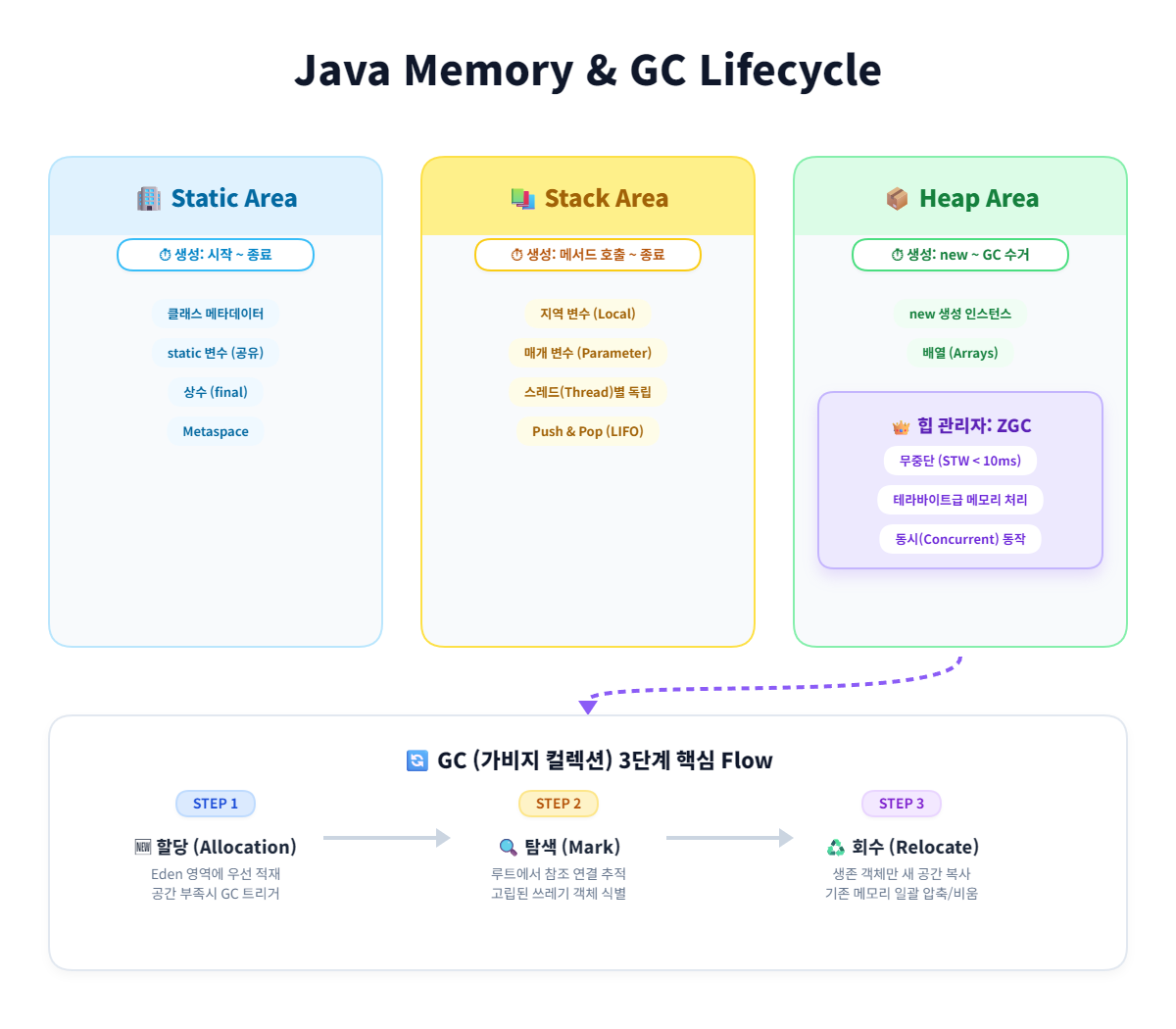
JVM의 메모리 관리는 프로그램의 성능과 직결됩니다. 노션에서 시각적으로 확인할 수 있도록 구조화합니다.
- Static (정적 영역): 프로그램 시작 시 할당되며 종료 시까지 유지됩니다.
- Stack (스택 영역): 메서드 실행 시 생성되고 종료 시 소멸하는 휘발성 메모리입니다.
- Heap (힙 영역): 객체가 점유하는 공간으로, 참조가 끊기면 가비지 컬렉터(GC)가 수거합니다.
- 최신 동향: Java 8부터 PermGen이 Metaspace(Native Memory)로 대체되어 메모리 고갈 문제를 개선하였으며, ZGC 도입으로 대규모 메모리에서도 정지 시간을 최소화하고 있습니다.
4. 통합 실습 예제: 연산기 및 예외 방어 로직
사용자로부터 정수를 입력받아 사칙연산을 수행하며, 잘못된 입력이나 0으로 나누기 등의 예외 상황을 안전하게 처리하는 코드입니다.
java
import java.util.Scanner;

public class CalculatorProject {
    public static void main(String[] args) {
        boolean flag = true;

        // Scanner를 try-with-resources로 선언하여 스트림 자동 종료
        try (Scanner sc = new Scanner(System.in)) {
            while (flag) {
                try {
                    System.out.print("첫 번째 정수 입력: ");
                    int a = sc.nextInt();

                    System.out.print("두 번째 정수 입력: ");
                    int b = sc.nextInt();

                    // 1. 산술 연산자 활용
                    int sum = a + b;
                    int difference = a - b;
                    int product = a * b;

                    System.out.println("\n--- 연산 결과 ---");
                    System.out.printf("더하기    : %d\n", sum);
                    System.out.printf("빼기      : %d\n", difference);
                    System.out.printf("곱하기    : %d\n", product);

                    // 2. 조건문을 통한 0으로 나누기 예외 방지
                    if (b != 0) {
                        // 정수형 형변환을 통한 나누기 결과 출력
                        System.out.printf("나누기(몫): %d\n", a / b);
                        System.out.printf("나머지    : %d\n", a % b);
                        flag = false; // 정상 계산 완료 시 루프 종료
                    } else {
                        System.err.println("나누기    : 0으로 나눌 수 없습니다. 다시 시도하세요.");
                    }

                } catch (Exception e) {
                    // 3. 타입 불일치 등 예기치 못한 입력 예외 처리
                    System.err.println("오류: 정수만 입력 가능합니다.");
                    // 중요: 버퍼에 남은 잘못된 입력을 비워줌 (무한 루프 방지)
                    sc.next();
                }
                System.out.println(); // 가독성을 위한 줄바꿈
            }
        }
        System.out.println("프로그램을 성공적으로 종료합니다.");
    }
}
5. 요약 및 핵심 포인트
- 상수 관리:
final과 스네이크 케이스를 사용하여 값의 불변성을 보장하고 가독성을 높입니다. - 안전한 형변환: 명시적 형변환 시 데이터 유실에 주의하며, 문자열 변환 시에는 반드시
try-catch로 예외를 방어합니다. - 메모리 효율: 객체는 Heap에, 실행 로직은 Stack에 쌓인다는 점을 이해하여 메모리 누수를 방지합니다.
댓글
GitHub 계정으로 의견이나 질문을 남길 수 있습니다.